Honing the tools: Just
In software engineering, and anything that implies computers, there is a high tendency to automate everything, even if it is not needed. Personally, to know when I really have to automate something I use this table:
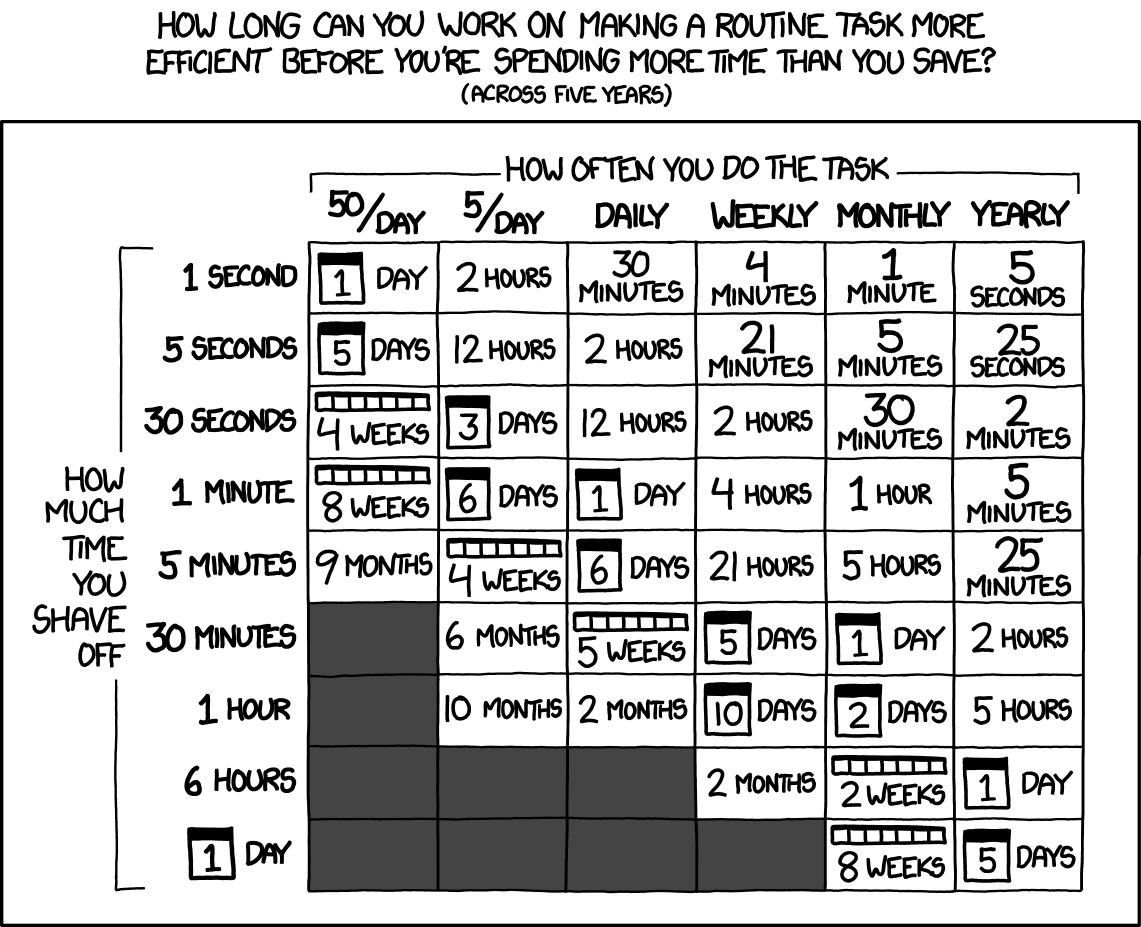
I know a picture that looks like a sketch doesn’t seem to be a truthful source of information, but I have found it to be quite accurate as a heuristic.
One example of such automations is in my current research job. I have a clearly repetitive workflow each time I run an algorithmic experiment. First create the jar file, second upload it to the VM to a newly created folder, third, run it. Each time I have to do this it takes me around 5 minutes, given that I have to do it everytime I implement a new idea or fix a bug, it is the biggest candidate to be automated within my job. So I have to do it 5 times a day, and it takes 5 minutes each time, I could dedicate 4 weeks to automate it.
First, I started using python, but it didn’t really cut it for me. Relying on python and its libraries, and its versioning gave me a few problems. The most distressing one was that I ran the command in different consoles, and some of them had Python3, others Python3.12 and others didn’t have the required libraries installed. Then I attempted to use bash, but it didn’t have a
Actually, it had none
. Last I found a perfect fit, just.
By the time I was looking for alternatives the Rust fever was already on. If something was written in Rust it seemed like a good and safe option to try, with little chance to break. Just is written in Rust, by
I used to play a lot of Enter the Gungeon, and it stuck with me that Casey was a character in that game too
. It is intended to be what I just needed, a tool to run short scripts, and avoid using tools that are not intended for that, like makefile.
Among the quality of life features that Just includes we have:
-
Automatic list of the commands, with parameters and even explanations if needed.
-
If you wrongly spell a command, it automatically provides as a suggestion the most similar command:
-
Allow to easily ignore and control return codes
-
Dependencies between commands! I cannot upload a jar if I haven’t built it.
-
It detects syntax problems effectively, before running anything you know if it is correct
I like to use it as a middleware between me and the project-specific commands. For instance, if I work with java, python, and node, I don’t really want to learn the update command for all of them, I will just (pun intended) create a recipe just update, and let it do whatever is needed. Anytime I need to do something that requires more than one command or I need to do it more than once, I am going to be defining a recipe just to make my life easier. As an example, this is the justfile I use for my research workflow:
set dotenv-load
set dotenv-filename := 'vm.env'
current-time := `date +'%Y-%m-%d_%H-%M-%S'`
jar-command := "java -jar "+current-time+".jar"
# Base folder for all operations - can be overridden when calling just
folder := "ExperimentationProject"

build:
    mvn package -DskipTests

upload_jar: build
    ssh ${USER}@${ADDRESS} -i ${PRIVATE_KEY_PATH} "mkdir -p {{folder}}/Experiments/{{current-time}}"
    scp -B -i ${PRIVATE_KEY_PATH} ./target/jar-with-dependencies.jar ${USER}@${ADDRESS}:${REMOTE_PATH}{{folder}}/Experiments/{{current-time}}/{{current-time}}.jar

# Run experiment without committing
run-no-commit INSTANCES_FOLDER: upload_jar
    ssh ${USER}@${ADDRESS} -i ${PRIVATE_KEY_PATH} "cd {{folder}}/Experiments/{{current-time}} && {{jar-command}} experiment  -p 75 -i '../../Instances/{{INSTANCES_FOLDER}}' -l 'severe'"

upload_instances:
    ssh ${USER}@${ADDRESS} -i ${PRIVATE_KEY_PATH} "mkdir -p {{folder}}"
    scp -B -i ${PRIVATE_KEY_PATH} -r ./Instances ${USER}@${ADDRESS}:${REMOTE_PATH}{{folder}}/

download:
    rsync -avz --progress --exclude='*.jar' --min-size=1 -e "ssh -i ${PRIVATE_KEY_PATH}" ${USER}@${ADDRESS}:${REMOTE_PATH}{{folder}}/Experiments/ Results/

failed:
    ssh ${USER}@${ADDRESS} -i ${PRIVATE_KEY_PATH} 'cd {{folder}}/Experiments && NEWEST=$(ls -t | head -1) && mv "$NEWEST" "${NEWEST}-FAILED"'

clean:
    mvn clean
    rm -f *.csv *.dot *.svg *.png *.log
As you can see there are multiple things going on. First, I load a env file, because I should be able to change parameters such as the IP or the user effortlessly. Second, most of the recipes are just one ssh command. This is far from wrong, I don’t want to remember the user, the address or the command I need to execute. Neither I want to have to look for the command in the history. I want it to be as easy as writing just run.
Third, I define variables within the justfile. For instance every time I run an experiment I want to name its folder as a timestamp, so I can keep track of when that experiment happened. I want to define too in which folder it is going to be stored, because I might be working on multiple projects at the same time. Last, I have a cleanup command. When programming I don’t want to worry about deleting old files or such, I just want to create as fast as possible and avoid that extra programming work. Instead, I run just clean and all that goes away.
Given that I don’t remember all the commands, I can just type just -l and the following available commands come out.
Available recipes:
    build
    clean
    download
    failed
    run-no-commit INSTANCES_FOLDER # Run experiment without committing
    upload_instances
    upload_jar
And if I misspell a command it corrects me:
$ just dowwload
error: Justfile does not contain recipe `dowwload`
Did you mean `download`?
I have tried multiple tools and none of them were a good command runner, just is the only one I have found to fit in that category. I consider this category of software as important as an IDE, the IDE makes it easier for you to program, the command runners make easier everything related to the program from deploys to updates. This had the effect of reducing the cognitive effort to keep track of the commands and the workflow. Before I had to manually do every step, now I can focus in the problem at hand.